
General Theme Settings
To access the General Theme Settings. Go to your WP Admin > Themify Theme > Theme Settings and select the Settings tab. You'll then see the following options
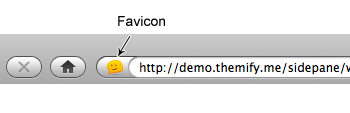
Favicon
Favicon is the 16 x 16px image which appears beside the address bar and in the bookmark, history menus, etc.
Custom Feed URL
The custom feed url will replace the default WordPress feed url (eg. http://www.yoursite.com/feed). For example, you can enter your Feedburner URL here.
Header Code (HTML)
Whatever you enter in the Header HTML will add in between the <head> tag. This is useful if you need to add additional CSS or Javascript files.
Footer Code (HTML)
Whatever you enter in the Footer HTML will add to the footer before the closing </body> tag. For example, you can add your Google Analytics tracking code here.
Search Settings
You can filter the search results by entering the category IDs here. Use minus sign (-) to exclude categories. For instance: "1,4,-7" will display the search results only for Categories 1 & 4, and exclude Category 7.
Check "Exclude Pages in search results" if you don't want your Pages to appear in the search results.
404 Page
Set a custom 404 page, that your site will redirect to when a 404 error occurs. We recommend creating a custom 404 page, and then set it as the 404 page here.
Feed Setting
The feed setting works identical as the search setting. If you enter "2,-9", it will include posts only from Category 2 and exclude Category 9 in the RSS feed.
Google Fonts
Select to whether you would like to show only the recommended Google Fonts only (set as default), or to show all Google fonts. Selecting to show all Google fonts may affect site load time.
Character Subset - Enter the additional character subsets you need to use from Google Fonts separated by commas.