

Themify holds a high standard when it comes to fast and SEO-optimized WordPress sites. If you are serious about your site’s health and performance, you ought to choose products wisely. For that, a steady and reliable core infrastructure is crucial; choosing the right web hosting provider is the first step.
In this article, we’ll take a look at Kinsta, a managed hosting provider that has earned a reputation as a solid and trustworthy company that delivers a fast and highly secure infrastructure for WordPress sites. Read our review below.
What is Kinsta?

Kinsta was founded in 2013, and since then, it has grown exponentially into a managed hosting platform serving over 230,000 businesses with a top rating on review platforms like G2 and TrustPilot. It has also recently earned #1 position on G2’s Best Hosting Product category. The platform’s core infrastructure is based on a next-generation cloud network and high-CPU servers for a performance-optimized environment. The service is further enhanced by an enterprise-level Cloudflare integration, hardware firewalls, and an array of built-in tools for a smooth site management experience.
Every site at Kinsta is housed in its own container with server resources allocated privately. The isolated container technology ensures that the resources are not shared with any other site on the platform. Each live site has access to 12 CPUs and 8 GB of RAM, while standard staging environments are allocated 1 CPU and 8 GB of RAM.
To demonstrate how Kinsta makes a difference when it comes to performance, we conducted thorough speed testing. You can read all our findings below to learn what makes Kinsta one of the best web hosting products on the market.
Performance Tests
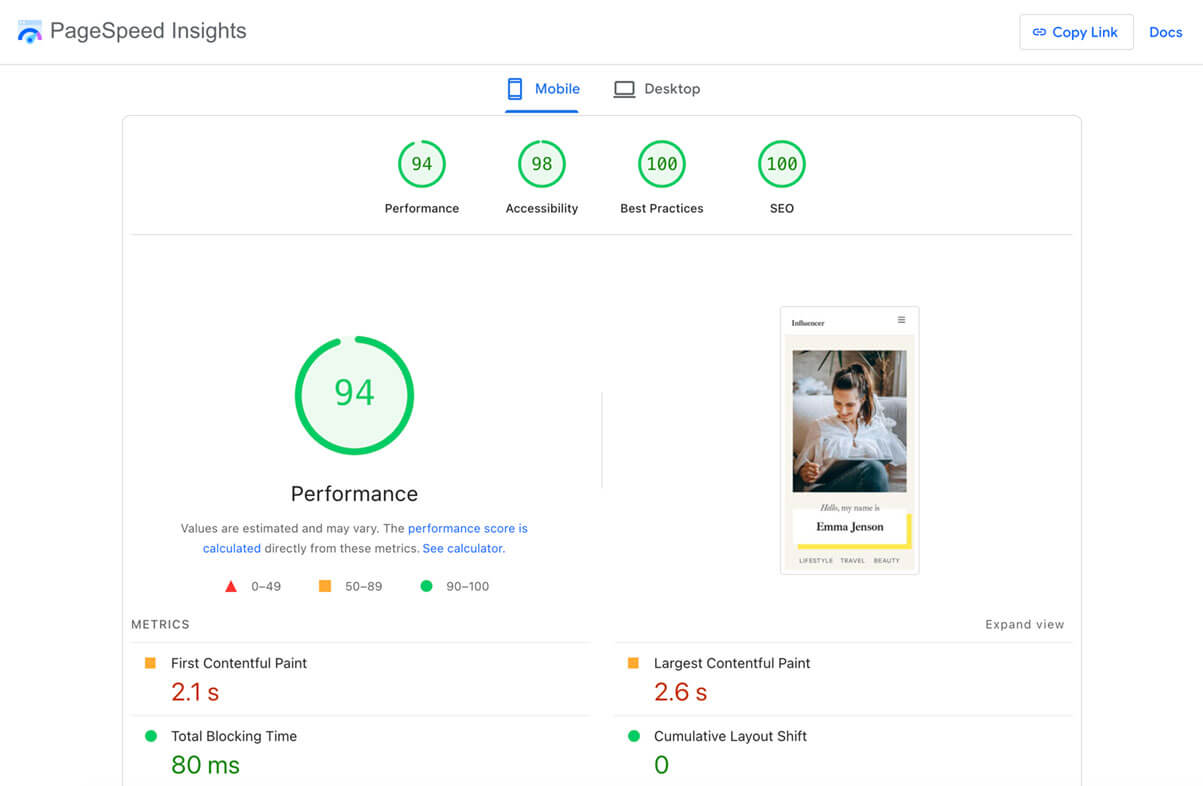
We ran a performance test on a Kinsta server with the Ultra Influencer demo imported. Because the demo is packed with images and videos, it serves as an excellent benchmark for page speed.
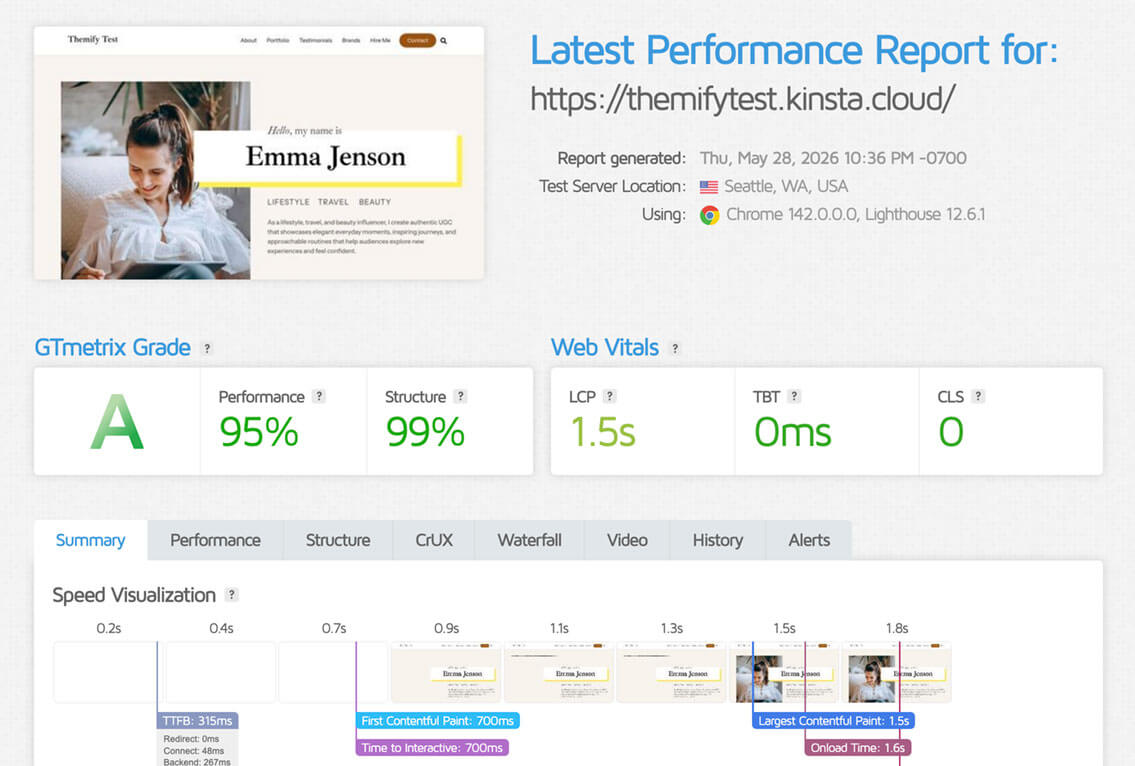
Kinsta hosting delivered exceptionally strong results. While performance tests always depend on page complexity and other variables, Kinsta showed an extremely fast server response time and an excellent real-world user experience. Even though the site is heavy on media, GTmetrix awarded it an "A" grade, and Google PageSpeed Insights scored it a 99 on desktop and 94 on mobile. That is impressive performance!
Kinsta Features
Let’s take a look at what features make Kinsta one of the best WordPress hosting providers.
Speed and latency
The outstanding performance revealed by our tests above is rooted in Kinsta’s powerful cloud infrastructure and high-performance servers. This foundation is augmented by a suite of features and optimizations designed to provide a high-speed hosting experience for every user on the platform.
To minimize latency and accelerate load times, Kinsta provides access to 27 global data centers and an expansive CDN with over 300 PoPs via its out-of-the-box Cloudflare integration. This allows customers to host their sites in the location best suited for their target audience.
Users can also leverage specialized speed-boosting tools, including built-in caching with customizable caching rules, Edge Caching, and Early Hints web standard provided through the Cloudflare integration.
Enterprise-level security
Private resource allocation and isolated containers for each site represent a serious security advantage, especially compared to shared hosting environments. The containerized infrastructure helps prevent malicious activities from spreading to other sites.
Kinsta also utilizes hardware firewalls and DDoS protection through Cloudflare to safeguard each hosted site. All verified sites on the platform are automatically secured by an SSL certificate; it also covers any subdomains of the main site (wildcard support).
Regular uptime checks (480/day) are included in the service with a 99.9% SLA-backed uptime. Automated full daily backups keep all hosted sites safe. The backup retention varies per plan, but is at least 14 days.
Custom site management dashboard
Kinsta’s service is characterized by innovative solutions and the urge to constantly deliver new features and additions to its users. It’s no surprise that they provide a custom, in-house dashboard for site management, called MyKinsta. If you’re used to cPanel or Plesk dashboards, there might be a bit of a learning curve with MyKinsta, but you’ll be impressed with all the features and tools available.
MyKinsta is equipped with all the tools you need for a smooth website management experience; you can have access to caching, backups, website analytics, CDN management, redirects, search and replace, one-click staging, and much more.
The dashboard also comes with a built-in Application Performance Monitoring tool to discover what’s slowing down your site. If you prefer New Relic, it’s also available from within the dashboard, but note that you need your own license.
An overview of installed themes and plugins across your sites is available in the MyKinsta dashboard, with the possibility of performing bulk actions like removing or updating select plugins/ themes. Additionally, a neat Automatic Updates feature is available as an add-on, which helps keep all plugins and themes updated across sites, complete with visual regression testing to catch and rollback any issues caused by updates. If you do need to access your WordPress admin dashboard, you can do it with just one click from within MyKinsta.
Kinsta’s multi-user feature provides granular access to the dashboard; you can invite as many users as you want to have access to different aspects of the account, such as site access, developer access, billing access, and more.
Powerful toolstack for developers
A seamless development experience is supported by SSH, Git, phpMyAdmin, and WP-CLI access. A powerful in-house REST API helps with various tasks and automations, such as WordPress site creation, clearing cache, creating reports, or scheduling tasks.
A local development tool called DevKinsta is also available from within the dashboard to deploy developed projects right to the Kinsta environment. It can also be used as a standalone free tool for offline site development. The tool is powered by Docker. Sites created are automatically configured with Nginx, PHP, and MySQL.
24/7/365 expert support
One of the most praised features of Kinsta on review platforms and user feedback is Technical Support. Kinsta offers 24/7/365 multilingual support via live chat. Support is provided by real humans, all skilled WordPress engineers.
The languages supported include English, Portuguese, Spanish, Italian, French, German, Japanese, and Dutch.
If you’re used to having phone support, chat support may sound disappointing at first, but after opening your first support chat, you’ll be convinced. Compared to other hosts, Kinsta does not have different level tiers of support, which means all customers on a paid plan have access to the same quality of support. Also, the average response time of Kinsta’s Support engineers is below two minutes with a 97% client satisfaction rate.
Plans and pricing
Yes, looking at the numbers, Kinsta’s pricing seems quite steep. However, as soon as you start reviewing all the features and resources allocated to its plans, you’ll soon feel the costs justified. The pricing is transparent, with no renewal fees or hidden costs.
Kinsta offers a range of plan tiers designed to accommodate projects of any scale. Recognizing that business requirements are diverse, their plan structure emphasizes scalability, allowing resources to expand seamlessly alongside your project’s growth.
At Kinsta, you are able to find a suitable plan for standalone WordPress installations by selecting one of the single-site Business plans, starting from a monthly fee of $35. If you have multiple sites, plans scale based on the number of WordPress installations and allocated resources. Multiple-site plans start from $70/ month. The entry-level plans for both single-site and multiple-site plans come with a free first month. If you subscribe to an annual plan, you’ll get two months’ hosting for free.
You can also choose between a visit-based or bandwidth-based pricing model. When opting for a visit-based model, your plan is defined by the monthly sum of the unique IP addresses seen each 24-hour period. For bandwidth-based pricing, the total server bandwidth is defined and scales based on the amount of monthly data (measured in bytes) that WordPress sites send in response to requests.
Features like the enterprise-level Cloudflare integration, 24/7 expert support, regular uptime checks, automated daily backups, custom dashboard, CDN, wildcard SSL, or DDoS protection. Plans scale along allocated disk space, visits or server bandwidth, and backup retention.
Who is Kinsta for?

Kinsta is a perfect choice for business sites; standalone or multiple-site WordPress installations that require a solid infrastructure with continuous uptime. Scalable plans grow with your project as it gets more visitors or requires increased resources. A set of add-ons is available for flexibility; accordingly, if you need more disk space, PHP resources (threads or memory limit), or additional WordPress installations, you can adjust resources easily without upgrading your hosting plan.
For web design and development agencies, Kinsta offers tailored solutions with a white-label option to help manage multiple sites seamlessly, and numerous perks through Kinsta’s Agency Partner Program.
How do Migrations Work at Kinsta?
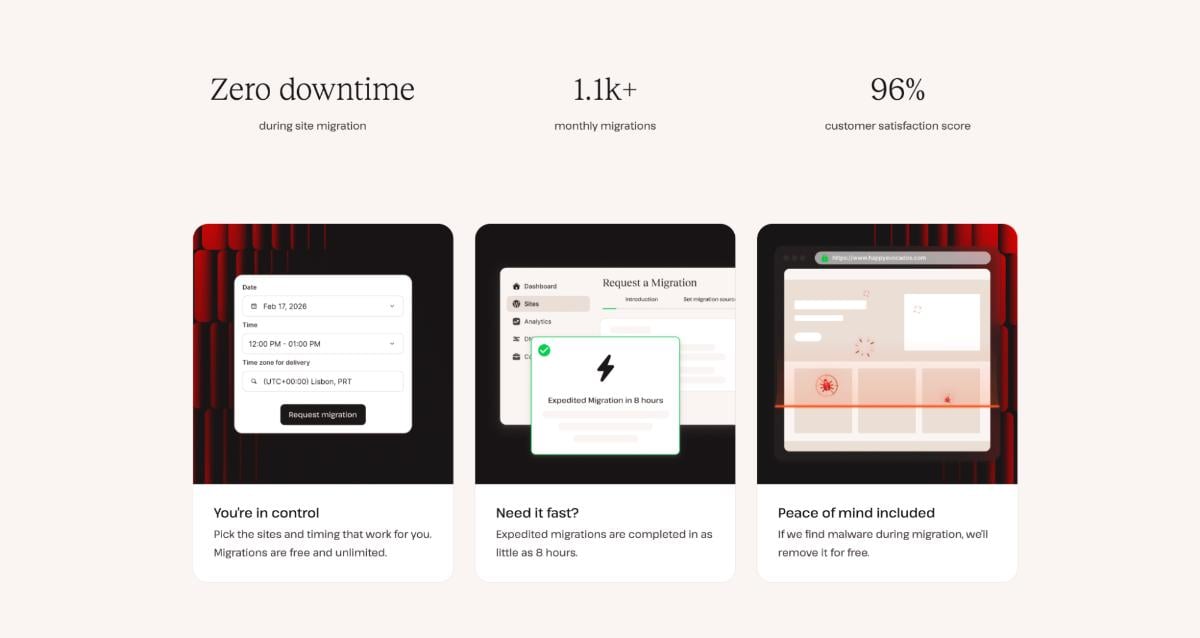
Kinsta has you covered for migrations by offering unlimited free migrations. White-glove migrations are conducted by a team of Migrations Engineers. All you need to do is create your account, log into MyKinsta, and request a migration. You can choose the migration time by selecting from three options: as soon as possible, on a specific day and time, or an expedited migration. Note that the latter option comes with a $49 fee and is conducted within 8 hours (between 9 AM and 11 PM, Monday to Friday (UTC)) – the fee is refundable if the team does not meet the 8-hour timeframe.
All migrations include free malware cleanup, and it is important to provide access to your hosting credentials and stay alert for messages from the Migrations Team. Once the migration is over, you can check everything through Kinsta’s site preview tool.
Sounds neat, doesn’t it?
Kinsta vs competitors
Kinsta vs WP Engine
Kinsta and WP Engine are often compared as they represent a similar price range and infrastructure. While the two services are comparable, some features at WP Engine come with an extra price (such as Application Performance Monitoring, choice of data centres, or uptime monitoring), and the core infrastructure varies per plan, so does the level of support.
Kinsta vs Siteground
SiteGround is a popular choice for smaller projects and has been delivering well for those starting out with site management. SiteGround’s core infrastructure is built on shared hosting, which can lead to security patches. While SiteGround performs well on speed tests, it lacks out-of-the-box solutions such as Cloudflare integration, white-glove migrations, or staging. While SiteGround’s plans also offer a level of scalability, and you can get started for a reasonable price, the renewal fee might come as a surprise after the first year.
Kinsta vs Cloudways
Cloudways is a popular choice for SMBs and has earned several qualifications on G2. Following its acquisition by Digital Ocean, users can select their server infrastructure, though the price varies based on their infrastructure and server type choice. A variety of features that are included in the service at Kinsta are provided by Cloudways as add-ons (enterprise-tier Cloudflare add-on with WAF and CDN, or automated backups).
Verdict
Themify themes perform especially well on Kinsta thanks to the platform’s optimized WordPress infrastructure, advanced caching, and high-performance server environment. We highly recommend Kinsta for its unparalleled speed, feature-rich and highly secure managed hosting for WordPress. Kinsta offers a 30-day money-back guarantee, which allows for hassle-free testing.