
We’ve added a new site registration feature to Themify Updater to give users better control over where their Themify licence is used.
With this update, users are now required to register their WordPress site URL before using Themify Updater. This helps ensure that updates are connected only to approved sites and gives account owners more visibility over the domains linked to their licence.
This feature is especially useful for freelancers, agencies, and developers who manage WordPress sites for clients. If you maintain multiple client websites, you can register each approved site URL from your Themify Member Area. When you no longer manage a client’s site, or you want to stop Themify Updater from working on a specific website, you can simply unregister that site URL.
Why Site Registration Is Useful
The new site registration system makes licence management clearer and more flexible. Instead of allowing updater access without domain control, users can now decide exactly which websites are authorized to use Themify Updater.
This is helpful if you manage websites for clients, want to keep track of active sites using your Themify licence, or need to remove updater access from websites you no longer maintain.
How to Register a Site URL
To register your WordPress site:
- Log in to your Member Area > License.
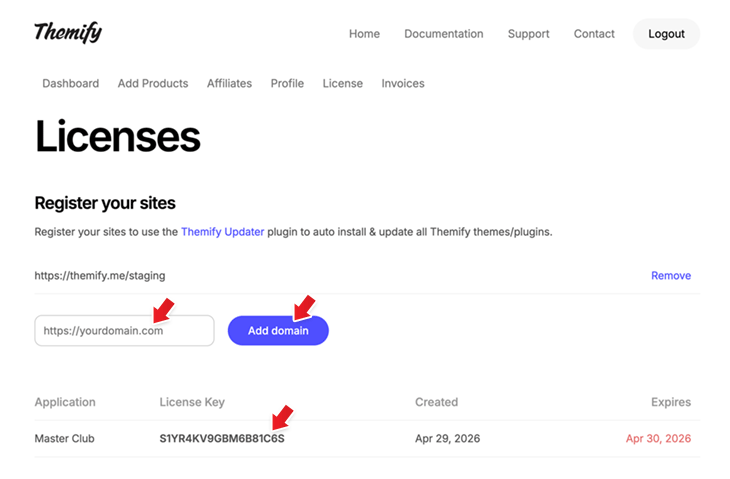
- Paste your WordPress site URL into the domain field, then click Add domain.
- It also automatically detects site URLs using your license key. When a site uses your license key, its URL will appear in your Member Area > License section. From there, simply click 'Approve' to register the site.
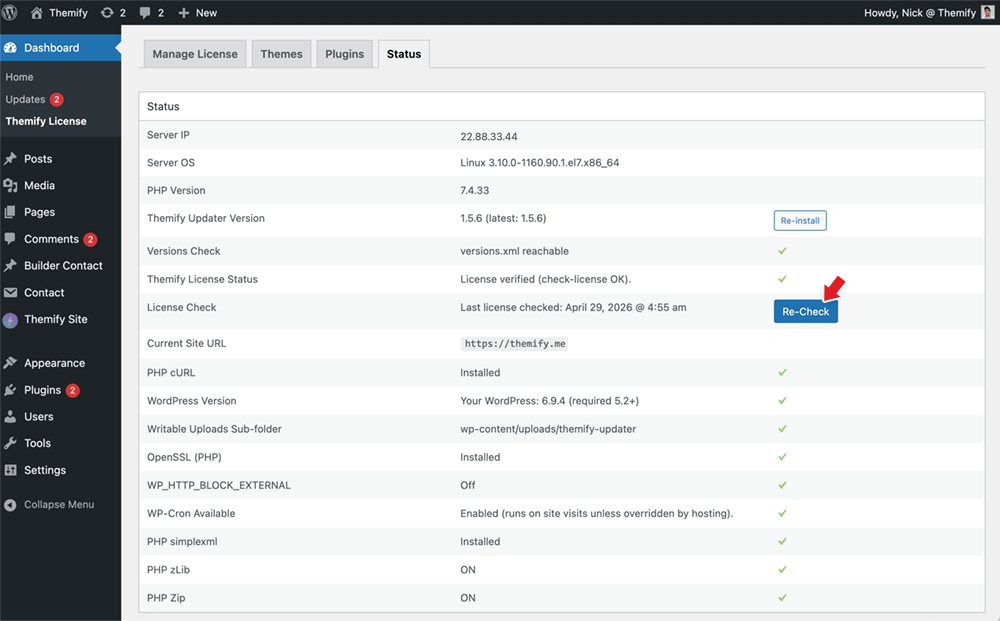
- After the site has been registered, Themify Updater should work as expected. If you see the site URL not registered message, go to your WordPress admin > Themify License > Status and click the Re-check button to refresh the licence status.
May 1, 2026 @ 12:57 pm
Please make sure all sites with a valid license are added automatically or make an API available. I can’t add them manually…
May 1, 2026 @ 4:26 pm
We second this! Definitely need an API here as we don’t want to have to manually add sites.
May 2, 2026 @ 12:37 pm
Perfectly reasonable and indeed useful idea which needs better implementation so one does not just click ‘update’ to then be greeted by ‘not available’ or an error such as ‘Update failed: The package could not be installed. PCLZIP_ERR_BAD_FORMAT (-10) : Unable to find End of Central Dir Record signature’
May 14, 2026 @ 1:03 pm
Same here. Cant do that manually; impossible.
May 1, 2026 @ 1:05 pm
This is a really amazing update because whenever our client stops paying, we can immediately suspend their license. So I think if we remove the website from our member area, the site will stop working or at least they will not be able to update the Themeify. What will be the sanerio?
May 1, 2026 @ 2:50 pm
What provision is there for testing and/or staging sites?
What about local sites running on a local web server – how is this handled?
May 1, 2026 @ 4:03 pm
It works with localhost and staging sites. You just need to add your site URLs in Member Area > License > site registration.
May 1, 2026 @ 4:26 pm
Brilliant!
May 1, 2026 @ 6:22 pm
So I tried something new this week.
I created a page, added all the Themify Builder modules, and exported them. Then I downloaded most of the websites I’ve built page by page and extracted their JSON files, organized them into a folder, and dropped everything into a Codex project.
I asked it to study the files and learn how to build layouts using Themify.
After some fine-tuning, I was able to upload a screenshot and get a clean Themify page ZIP in return.
Honestly, I’m pretty amazed. Now I can simply paste a design image or connect Codex to Figma via MCP to generate the layout, upload it to my site, and just add images and links afterward.
I think this could get even better if we had a more advanced AI builder for Themify that can handle more complex layouts. This could easily become a new source of recurring revenue for the team.
Here’s a client landing page I built using this workflow: barlary.com
May 2, 2026 @ 12:40 pm
Sounds cool. How might normal mortals achieve this?
May 5, 2026 @ 1:23 am
Yes, AI feature is on our roadmap. If you guys have any suggestions, feel free to share.
May 30, 2026 @ 11:52 pm
Honestly? The way you executed this flow, your idea, is simply incredible. Regardless of the final aesthetic result, which in my opinion turned out really cool.
May 1, 2026 @ 6:32 pm
Finally!
Now, when will Themify do something regarding AI?
Thank you!
May 3, 2026 @ 5:11 am
Sounds really good at first.
But I don’t quite understand: Currently, there are several sites using my license. I’d like to deactivate some of them. But I can only add them, not actually deactivate them. I think it should show all the sites using my key under “Licenses,” and then there should be an option to deactivate each site. Because right now, all updates and usage are happening without me being able to see which sites are using my key under “Licenses” so I can deactivate them if necessary.
May 5, 2026 @ 1:22 am
If you don’t add their sites on Member Area > License, those sites won’t be able to update any Themify products. This Updater site registration is built exactly for situations like yours. Now you can have control who can use your license key to have access to Themify updates.
May 6, 2026 @ 6:50 am
Hi Nick, we have been with Themify since 2015 and have many, many client sites. How do you expect us to now add them all the Member Area? Have you given any thought to using an API or something to automatically do this linked to a valid licence?
May 3, 2026 @ 5:23 am
Or is it the case that only registered websites will now work with the key?
May 4, 2026 @ 8:04 am
“With this update, users are now required…”. Required or optional?
I cannot possibly add all my client sites from 2015.
May 8, 2026 @ 3:48 am
You can’t possibly or seriously mean we have to manually add all sites we’ve ever built?
This is far from a working solution. All sites with a valid license need to be added automatically.
May 9, 2026 @ 6:00 am
We’ve made an update to address this. On Member Area > License, it detects all sites that use your license key, you can just click “Approve” to register the detected sites.
May 10, 2026 @ 6:24 am
Hi Nick. Where do I find this? Going to Member Area > License, I can only see the license and no sites to be approved. I really don’t want to manually add dozens of websites.
May 26, 2026 @ 5:53 pm
Same here, I do not see any websites I have not already added manually.
May 27, 2026 @ 6:02 am
On your WordPress sites, make sure you update to the latest Themify Updater plugin and enter your license key. Once your license key connects to our updater API, your site URL will appear under Member Area > License. From there, simply click ‘Approve’.
May 12, 2026 @ 6:41 am
We bought a Themify Lifetime Club licence for our association website long ago.
Now updates stopped working with an error, but no error message.
I only by chance discovered this page.
Disabling updates without proper error messages are extremely bad practice, as also security-related updates would now be missing.
May 14, 2026 @ 1:10 pm
This is the worst update since we started using themify. We cannot and will not add each of our websites manually to this UI – that would result in a massive disruption of our Workflows.
Also, it is terrible practice to just cut off all updated w/o any type of information. I needed to actively research why our updates are not firing after 3 hrs of looking for the issue in other parts of the installation.
And let me guess; next step is to cap the number per Websites per Lifetime-Users – got it.
As even themify is now starting to screw over its user, we have decided to develop something similar internally, as we unfortunately and obviously can’t rely on anything from a 3rd-Party these days.
This is now becoming an extremely frustrating.
May 14, 2026 @ 7:38 pm
In the Member Area > License section, the system auto-detects the site that is calling the license check API. You just need to click “Approve” to register the site. You only need to add the site URL once, and the Updater will continue to work exactly as it did before.
We will continue to honor our “unlimited sites” commitment.
May 15, 2026 @ 12:01 pm
Nick, Thanks for your answer, but that’s not gonna work for us. First thing is I have no such option in the license management.
I don’t see any option to invoke all sites registered with the license key. And I am refusing to add them all manually. The system DOES NOT autodetect any domain in my case!
As other commentators already wrote, this is not a good practice. Not at all. It’s just bad UX and obviously, badly tested. So bad that I need to ask: has this feature been tested at all, or are we just doing the testing?
May 15, 2026 @ 12:05 pm
My main concern is; for every tiny one-pager, for every test/dev site it is now needed, to register with your stupid UI – An extra login, extra permission management and all in between. NO! Just NO! Either this registers pages automatically or I’m out.
May 15, 2026 @ 12:06 pm
Our customers already calling, asking why Theme Updates are stuck.
Thanks for all the additional pain and extra work!!
May 15, 2026 @ 10:46 pm
We sincerely apologize for the inconvenience. If your client sites trigger license check or “Re-check”, the site will appear on your Member Area > License with an “Approve” button. You just need to click approve to register the site. If you don’t see the site with approve button, it means the updater is cached and there is no request to license check. You only need to register the site once and the updater will work.
May 18, 2026 @ 11:11 am
So, that basically means, that we have to manually login into EACH and EVERY one of our pages just to trigger this?
Sorry, but that’s clearly not an appropriate solution.
We need something where we DO NOT HAVE TO do manual actions on every website we are currently hosting.
May 18, 2026 @ 11:15 am
No, Nick, I just checked – this is not working for us. And tbh, I don’t have time to deal with this on every page we set up for our clients.
We need a solution that does not require manual intervention in each instance.
May 14, 2026 @ 6:34 pm
I actually love this feature. I was one of the users who requested this. I manage many web sites for clients and also provide white label services. A lot of time, clients stop our services and revoke access, there is no way for us to remove our license key. Our clients could continue to use our license key updating all Themify themes and plugins (because we have a lifetime membership).
Now, I just remove their site URL on member area. I can even see who is using my license key without my permission because it shows the approve button on member area. You just click approve, approve, approve – it takes no time. If you don’t see the approve button, it means the site never checks the license key. If the site never checks license updater, does it really matter you register it or not (it just means the site is lack of maintenance)?
A lot of other theme companies are doing similar model. As a freelancer, I’m happy with this feature and finally it is here after so many years using Themify.
May 14, 2026 @ 7:39 pm
Thank you for your support.
May 15, 2026 @ 12:46 pm
Why did you not use a vice-versa-approach? Instead of having us to register all Domains manually, just add them all to the list and allow manual exclusion instead of manually adding them all – same result but w/o all the pain users are now facing.
I say it loud and clear; We are already working on a fully migratory replacement, as I can already see which direction this is taking.
If you will take longer to provide an actually viable solution to all users, even the agencies that are managing hundreds of sites, not just the freelancers who may be are happy with this half-baked solution in my eyes, then I see myself forced to replace themify once and for all using AI and never use it nor advertise it anymore. This is serious.
May 15, 2026 @ 10:24 pm
I like this new feature. Before I used to enable hide my user name and license. Now I can disapprove them without worrying my license being used by them. It is actually a good feature. Most theme licenses are handled like this. +1 for me
May 19, 2026 @ 12:04 am
We’ve pushed another update to make site registration even faster. Now, once a site is auto-detected, it will appear under Member Area > License with an “Approve” button. Clicking “Approve” automatically triggers a license “Re-check” on the target site, saving you from having to click it manually. Make sure you are using the latest Updater 1.6.0+.
May 20, 2026 @ 8:48 pm
Great, that is a vital step forward. Now, it would be a great enhancement to provide an option like “Auto-Approve on|off” – So we can decide either to approve each site w/o any further actions (no maunal approval) or, like its now implemented, with the required manual approvals beforehand. That would basically enable to set everything back to “as-given”, which a lot of users would be grateful for.
In both cases, the intention of the feature, namely to provide better control for licence mgmt, would be given w/o having any user break their workflow and log in separately here for each site just to approve.